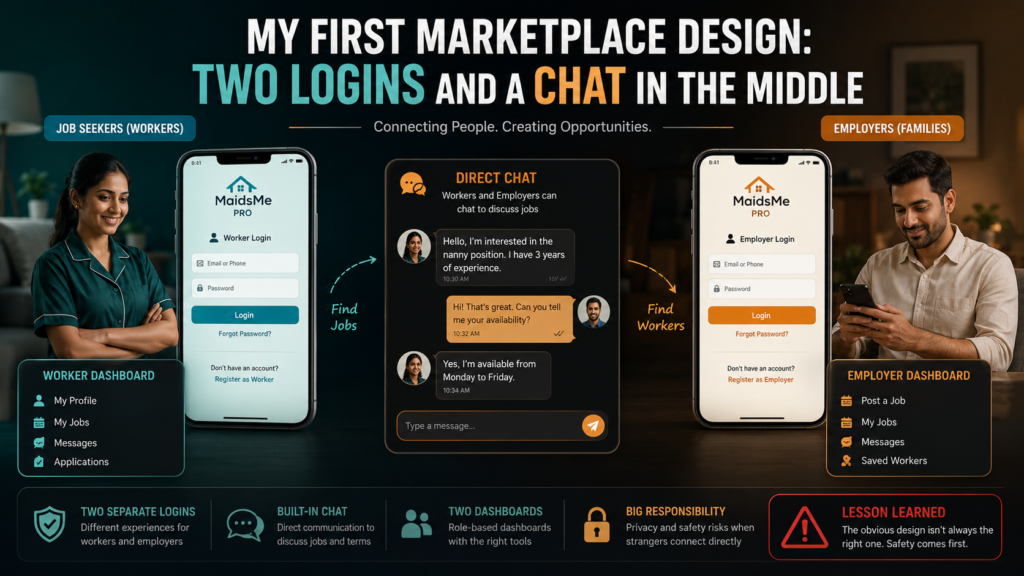
My first design for MaidsMe was symmetrical, and the symmetry felt like quality. Two kinds of users, so two of everything, a registration and login for job seekers, a registration and login for employers, a dashboard for each, and a chat connecting them in the middle. This post is that version as I actually built it, because the next post tears it down, and the teardown only makes sense if you see how reasonable version one looked.
The two sides each got dedicated pages, created by the plugin on activation, with WordPress roles separating them:
// Activation: pages and roles for BOTH sides
add_role('mm_job_seeker', 'Job Seeker', array('read' => true));
add_role('mm_employer',   'Employer',   array('read' => true));

// /job-seeker-login/  /job-seeker-register/
// /employer-login/    /employer-register/
// and a dashboard shortcode for each role
Login routed each role to its own dashboard, workers to profile editing and document uploads, employers to browsing and saved candidates. Between them sat the chat, an inquiries-and-messages system, employer opens a conversation from a profile, worker replies from their dashboard, the admin able to view all of it. The database matched the symmetry, a profiles table for workers, an employers table for the hiring side, a messages table joining them.
Technically, all of it worked, and building it taught me the mechanics this kind of platform runs on. Role-based redirects after login, checking the user’s role and sending them to the right dashboard. Shortcode dashboards that render differently per role. Capability checks so an employer request can never touch worker-editing endpoints. A messages table with sender, receiver, and read flags, polled from both dashboards the same way the limo chat worked.
// The heart of the symmetry: route by role after login
$user = wp_get_current_user();
if (in_array('mm_employer', $user->roles, true)) {
    wp_safe_redirect(home_url('/employer-dashboard/'));
} else {
    wp_safe_redirect(home_url('/seeker-dashboard/'));
}
exit;
And yet, watching the flow as a whole, something was off, and I could measure it. Count the steps an employer walks before anything useful happens, arrive, register, verify, log in, browse, open a chat, wait for a reply. Six or seven steps of friction in front of the only action that matters, a hiring inquiry reaching the admin. Every account system I had built doubled the maintenance surface too, two registration flows to secure, two password reset paths, two dashboards to keep working. The symmetry that felt like quality was actually cost, and the chat, my proudest piece, put an unmediated channel between strangers on a platform whose entire premise was mediation. Version one was thorough. Whether it was right is the next post.
A few things people ask me about this
How do you send different users to different dashboards in WordPress? Assign custom roles at registration, then on login check wp_get_current_user()->roles and wp_safe_redirect to the role’s page. Guard each dashboard’s actions with capability checks, never trust the redirect alone.
Was the chat technically hard? No, a messages table plus polling, the same pattern as any simple chat. The problem was never difficulty, it was that direct chat contradicted the admin-mediated design. The right question about a feature is fit, not feasibility.
Next
I sat with those counts for a day, and then did the thing this series is proudest of, I tore my own working design down. What went, what stayed, and what deleting tables feels like, is the next post.