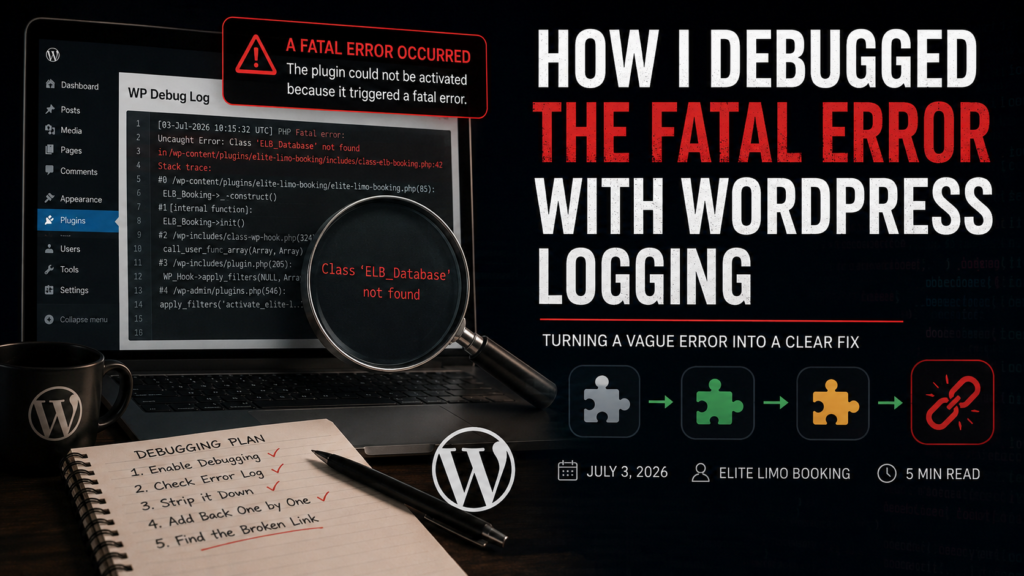
A plugin that would not activate, and a message that told me nothing. The previous post ended with the reframe, the real error is in a log, so this post is the practical half, switching that log on, reading it, and the strip-it-down method I used when the log alone was not enough. These few lines have since saved me on every WordPress project.
WordPress’s debug system is three constants in wp-config.php, the file in the site root. Find the line that says stop editing, and put these above it:
define('WP_DEBUG', true);          // turn debugging on
define('WP_DEBUG_LOG', true);      // write errors to a file
define('WP_DEBUG_DISPLAY', false); // do not print errors on the site
The division of labour matters. WP_DEBUG turns error reporting on. WP_DEBUG_LOG sends everything to a file, wp-content/debug.log, created automatically on the first error. WP_DEBUG_DISPLAY false keeps errors off the visible site, on any site anyone else can see, you want logging without display, broadcast errors leak paths and internals to the world.
With logging on, I clicked Activate again, opened wp-content/debug.log, and there it was, the real error, with the exact file and the exact line number, everything the activation screen refused to say. For most fatals, that is the whole hunt, read the last lines of debug.log, go to the file and line, fix what it names. PHP fatals name their location precisely, uncaught Error, in /path/file.php on line N.
Mine needed one more technique, because the named line was where the crash surfaced, not where the cause lived. For that, the strip-it-down method: comment out everything the plugin loads, activate, then restore pieces one at a time until the fatal returns. The piece you just restored contains the cause.
private function load_dependencies() {
    require_once ELITE_LIMO_PLUGIN_PATH . 'includes/class-database.php';
    // require_once ELITE_LIMO_PLUGIN_PATH . 'includes/class-firebase-otp.php';
    // require_once ELITE_LIMO_PLUGIN_PATH . 'includes/class-stripe-payment.php';
    // require_once ELITE_LIMO_PLUGIN_PATH . 'includes/class-driver-assignment.php';
    // require_once ELITE_LIMO_PLUGIN_PATH . 'includes/class-notifications.php';
}
Activate with only the database class, works. Restore OTP, works. Restore payments, fatal returns, the cause lives in the payment class or what it loads. That is binary search wearing work clothes, and it turns an unknown somewhere into a known here in a handful of activations. One last discipline, when the hunt ends, set WP_DEBUG back to false on a live site, debug mode is a workshop tool, not a permanent state.
A few things people ask me about this
Where is the WordPress debug log? wp-content/debug.log, created automatically after the first logged error once WP_DEBUG and WP_DEBUG_LOG are true. If it does not appear, check that wp-content is writable.
Is it safe to enable WP_DEBUG on a live site? Briefly, with WP_DEBUG_DISPLAY false so nothing prints publicly. Log, fix, then turn it back off.
Next
The next crash was subtler, the plugin activated, then died the moment it met Elementor, and the cause was not code but timing. The rule about when you are allowed to touch another plugin’s classes is the next post.