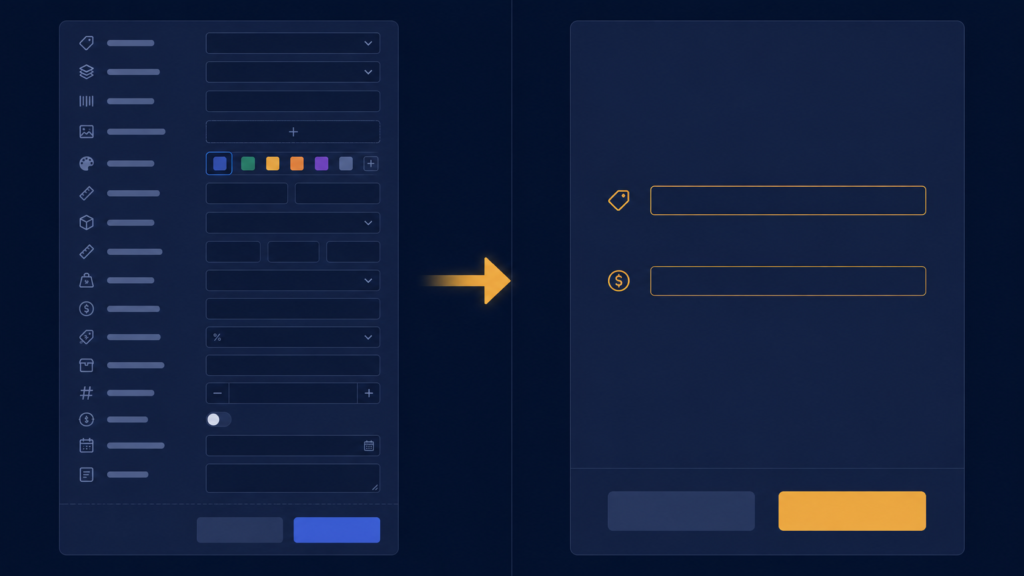
When I first built the product form, I gave it everything a shop product could possibly have. Category. Color. Size. Name. Price. Stock. It felt thorough. It felt professional. And it was wrong. This post is about realising that, and cutting the form down to what a clothing shop actually uses, which taught me the same lesson my video tool did, from a fresh angle.
The problem showed up the first time I imagined real use. A shopkeeper entering a delivery of forty items does not want six fields per item. Category, color, size means typing the same words over and over, and worse, deciding them, is this shalwar kameez under Suits or Traditional? Decisions are slower than typing. Meanwhile, the shop already had its own system: every article has a number. Shopkeepers talk in article numbers all day. My software was ignoring the identifier the business actually used, while forcing three fields it never used.
So the fix was not adding a field, it was deleting three and adding the right one. The products table went from my imagined thoroughness to the shop’s reality:
# Before: category, color, size... fields the shop never used
# After: the shop's own identifier, article number
self.cursor.execute('''
    CREATE TABLE IF NOT EXISTS products (
        id INTEGER PRIMARY KEY AUTOINCREMENT,
        name TEXT NOT NULL,
        article_number TEXT,
        cost_price REAL,
        selling_price REAL,
        stock_quantity INTEGER,
        created_date TEXT
    )
''')
One practical note for anyone changing an SQLite schema mid-project: CREATE TABLE IF NOT EXISTS will not alter a table that already exists. During development the honest options are to delete the .db file and let it recreate, fine before real data exists, or to use ALTER TABLE products ADD COLUMN article_number TEXT on a live database. Knowing which situation you are in matters, the first destroys data, the second preserves it.
Notice article_number is TEXT, not a number type, even though shopkeepers say number. Real article numbers contain letters and dashes, A-102, KJ55, and a numeric column would reject or mangle them. Store identifiers as text unless you will do arithmetic on them, you never sum article numbers.
Entry time for a product dropped to seconds, name, article number, two prices, quantity, done. Every field earned its place by being used at the counter or in the profit report. Nothing was there to look professional.
A few things people ask me about this
Why did my new column not appear in SQLite? Because the table already existed, and CREATE TABLE IF NOT EXISTS skips existing tables. Use ALTER TABLE ADD COLUMN on a live database, or delete the .db file during early development.
Should product codes be INTEGER or TEXT? TEXT. Real-world codes contain letters, dashes, and leading zeros that numeric columns destroy. Use numbers only for values you calculate with.
Next
A short form made entering products fast. But at the counter, finding a product had to be even faster, a customer is standing there. Building real product search into billing is the next post.